
Jira statuses are grouped into three categories that represent different stages of the work item lifecycle:
-
To Do – Such as Open, Draft, Waiting for Support, Selected for Development
-
IN Progress – Such as In Progress, Pending Approval, and Escalated
-
DONE – Resolved, Canceled, and Closed
Clockwork uses these status categories to know when it should start or stop a timer as follows:
-
When an item is transitioned from a To Do or Done category status to a In Progress category status, and the item has an assignee, a timer will be started.
-
If item is in an In Progress category status and the assignee changes, the timer will stop for the previous assignee and start for the new one.
-
If item is is in an In Progress category status and the item becomes unassigned, the timer will stop.
-
When item is moved from In Progress status category to a To Do or Done category status, the timer will be stopped.
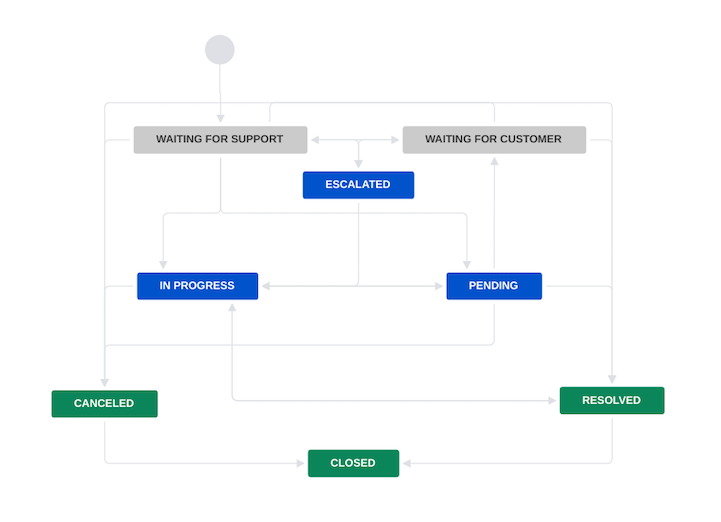
For example, timers will start and stop as follows for transitions in the workflow shown above:
|
From |
To |
Timer |
|---|---|---|
|
Waiting for support |
Escalated |
Timer starts |
|
Escalated |
Pending |
No change |
|
Waiting for support |
Closed |
No change |
|
Pending |
Resolved |
Timer stops |
|
Cancelled |
Closed |
No change |