
Atlassian is sunsetting its previous app development platform, Connect, at the end of 2026. The most recent versions of Checklists for Jira apps are now running on the newest Forge platform. However, if your Jira site has not updated apps in a while, it may still be using the older version of the app based on the platform that is no longer supported.
This means that any security patches, new features, and bug fixes can only be released on the newest Forge version.
How to update
All you need to do is open the list of connected apps and click Update. No migration is needed, the app will be updated without interruptions.
-
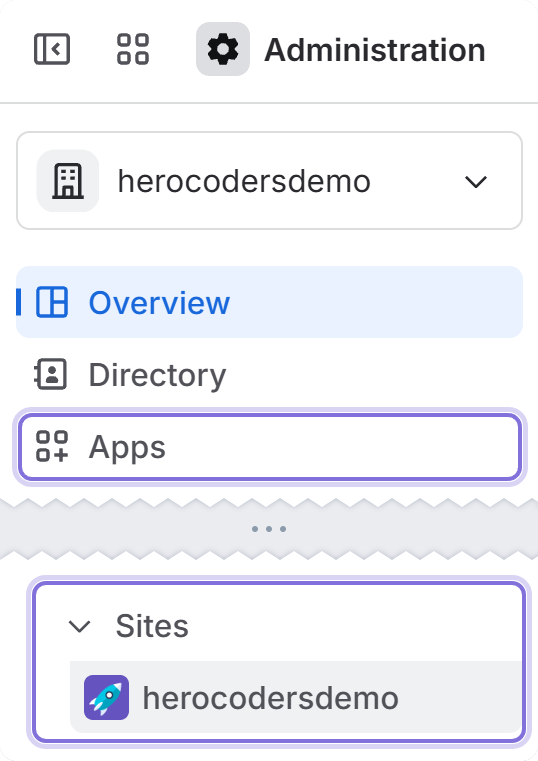
Go to Administration
-
Click Apps in the sidebar
-
Open Sites and choose your site.
-
On the site administration page sidebar, click Connected apps.
-
Find Checklists for Jira in the list and click View app details.
-
At the top you will see the Update button.
Jira may then ask you to re-confirm some permissions. The app will have the same access level as before, but permissions are more granular on the Forge platform: where before you would grant only one write permission, now it is separated into clear access areas, what the app can write to, so you can have more visibility into app access.
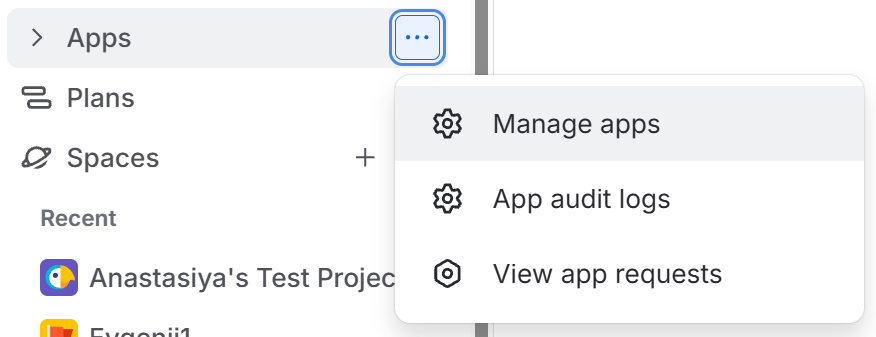
Or you can also reach it by clicking More on Apps in your Jira sidebar, and then Manage apps.
What changes with the update?
Good news: your data is completely safe. All your checklists, templates, and app settings are going to remain unchanged. There are only a few minor changes that may happen:
-
If you use checklist custom fields in Jira screens or on board cards, it may need to be added again, because Jira recognizes the Forge fields as new ones.
-
Jira may sometimes hide the checklist panel when it is not manually added by a user.
-
Mobile view is no longer supported by Atlassian, so checklists cannot appear on the mobile Jira app. However, they are still accessible from the web view on mobile devices.
-
Same permissions as before, only the Forge platform provides more granular permission lists.